

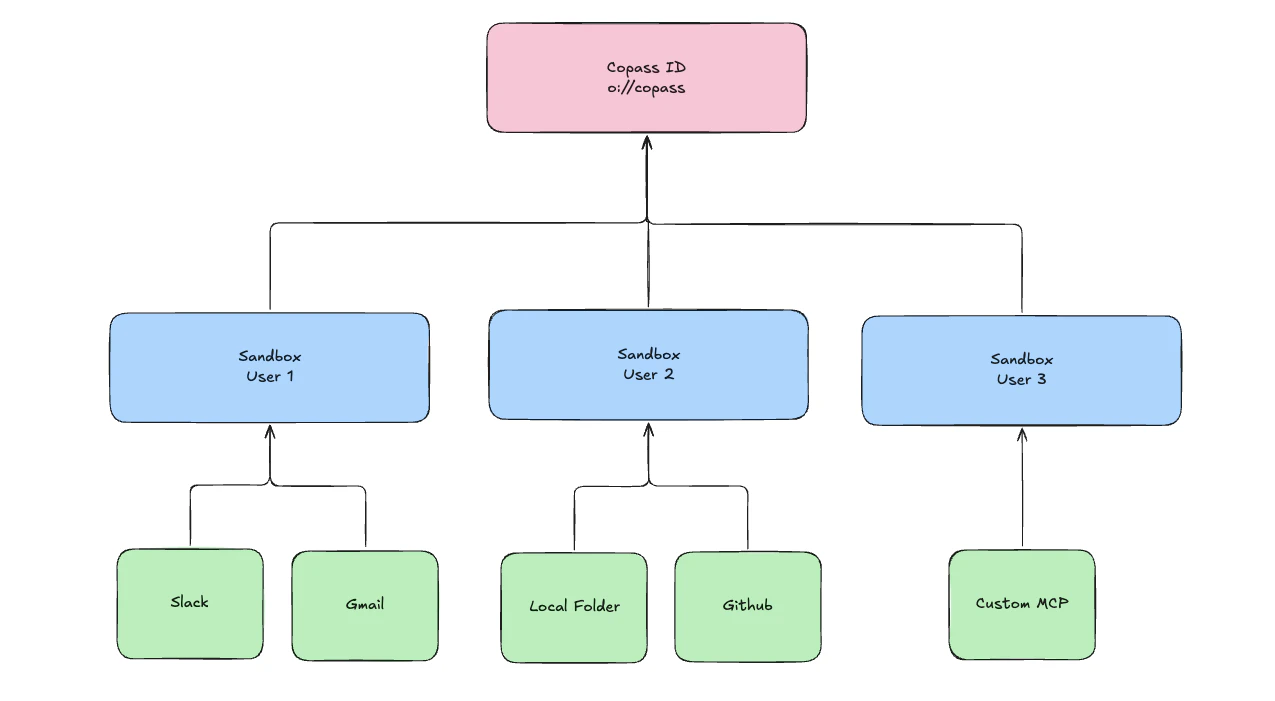
The three primitives
| Primitive | Role | Created by |
|---|---|---|
| Sandbox | Top-level tenancy unit. Owns the encryption boundary, enforces quotas (max_data_sources, max_projects, max_storage_bytes), cascades on delete. | client.sandboxes.create({ name, owner_id, tier }) |
| Data source | The unit of attribution. Every ingested byte is tagged with a data_source_id. Providers include custom, slack, github, linear, gmail, jira, notion. | client.sources.register(sandboxId, { provider, name, ingestion_mode, adapter_config }) |
| Project | Sandbox-scoped logical grouping. Retrieval scopes by project. M:N with data sources via a link table. | client.projects.create(sandboxId, { name, data_source_ids }) |
discover / interpret / search — is covered in Retrieval.
Containment and uniqueness
- A sandbox lives inside your Copass account.
(owner_id, name)is unique per account — the sameowner_idcan hold multiple named sandboxes (useful for per-user or per-environment partitioning). - A data source belongs to exactly one sandbox. Its
sandbox_idis immutable; there is no “move between sandboxes” operation. - A project belongs to exactly one sandbox and references data sources in that same sandbox via a link table. A source may belong to any number of projects; a project may include any number of sources.
- Ingestion records
(sandbox_id, data_source_id, project_id?)on every write. Retrieval reads honor the same scoping.
Ingesting data
Push content into a sandbox via the SDK. Every byte gets tagged with thedata_source_id (and optionally a project_id) so retrieval can scope cleanly later.
Where ids get persisted
You need the three ids —sandbox_id, data_source_id, project_id — handy on every request. Two common patterns:
- CLI: writes them into
.olane/refs.jsonat the project root on first use. - TypeScript app: call
client.sandboxes.create(...)+ensureDataSource(...)+client.projects.create(...)once, persist the returned ids in your own config store, reuse forever.
How sandboxes power agents
Every Agent Router call is scoped to a sandbox. When you run an agent:- Tools come from the sandbox’s data sources — OAuth’d integrations (
router.integrations.connect('github', …)), ingested folders, custom data sources. The agent picks them up automatically. - Memory (the Context Window) lives in the sandbox, not in the LLM provider’s session store.
- End users are isolated inside the sandbox via
endUserId— one sandbox, many humans, no cross-talk.
Next steps
- Retrieval — how
discover/interpret/searchread from the data you ingest into a sandbox. - Multi-tenancy — how one sandbox holds many end users, and how to pick
endUserId. - Agent Router — run a hosted agent against this tenancy model.
- Portable Context — why the runtime is swappable on top of this model.
- CLI — inspect, create, and manage these resources from the terminal.
- SDK — the idiomatic way to bootstrap and reuse these ids from code.